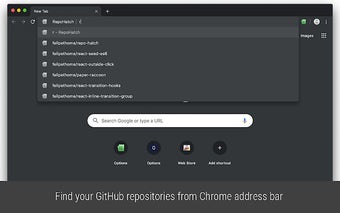
RepoHatch for GitHub - Access Your Repositories from the Address Bar
RepoHatch for GitHub is a Chrome extension developed by Felipe Thome that allows users to easily find and access their GitHub repositories directly from the address bar. With a simple keyboard shortcut of pressing the letter 'h' followed by the 'tab' key, users can activate the extension and begin searching for their repositories.
One of the standout features of RepoHatch is its fuzzy search functionality. Even if users only remember part of the repository name, the extension will still be able to find and display the relevant results. This saves users time and effort in locating their repositories, especially if they have a large number of them.
Additionally, RepoHatch offers convenient shortcuts to access specific pages within a repository. By typing the letter 'p', 'i', or 't' after the repository name, users can quickly navigate to the pull requests, issues, or search pages respectively. Users can also apply optional filters to further refine their search results.
Overall, RepoHatch for GitHub is a free and open-source Chrome extension that provides a streamlined and efficient way for users to access their GitHub repositories directly from the address bar. Its fuzzy search functionality and convenient shortcuts make it a valuable tool for developers and GitHub users.